Windows Phone Thoughts - Daily News, Views, Rants and Raves

Be sure to register in our forums! Share your opinions, help others, and enter our contests.


Zune Thoughts

Loading feed...

Digital Home Thoughts

Loading feed...

Apple Thoughts

Loading feed...


All posts tagged "exchange"


Tuesday, September 22, 2009

GMail Pushed To Your Device

Posted by Ed Hansberry in "Pocket PC News" @ 10:00 PM

http://googlemobile.blogspot.com/20...il-support.html

"Earlier this year, we launched Google Sync which allows you to synchronize your Gmail Contacts and Google Calendar with your iPhone, Windows Mobile, and S60 devices. Today, we're adding Gmail support to Google Sync for iPhone, iPod Touch and Windows Mobile devices. "

Using ActiveSync on your device, you can connect to Google's Exchange Server service and sync your contacts and appointments real time. Now GMail messages themselves have been added to the mix. No more configuring iMAP mail boxes. This is a great service for those that don't have their phone connected to a work server. I wish I could sync my messages up with this service, but work email is more important on my phone than my personal email.


Thursday, June 4, 2009

Chronobis Allows Outlook Web Access Sync

Posted by Jason Dunn in "Smartphone Software" @ 09:30 AM

http://www.chronobis.com/

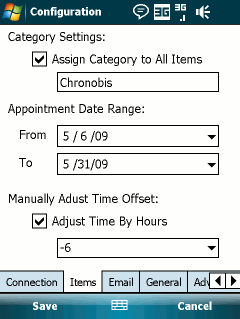
"Chronobis is a FREE Outlook Web Access (OWA) to Windows Mobile device synchronization program. It connects directly to OWA from your Windows Mobile device and does not require any special permissions or options to be enabled by your company's IT department. If you can access Outlook Web Access (OWA) from a public internet connection, you can sync Exchange calendar to your PocketPC (PPC) device using Chronobis. Chronobis also runs completely self-contained on your Windows Mobile device, no need to install software on your desktop, work computer, or use any "3rd party service"."

Chronobis solves only one problem, but it's a problem that can be quite vexing if you happen to be impacted by it: if your organization uses an Exchange server, but doesn't allow mobile devices to sync against it, you can use Chronobis to sync your Windows Mobile smartphone with your Exchange server - provided that your organization allows Outlook Web Access. And it's free - the author only asks for a small donation if you find it useful.


Friday, April 24, 2009

Windows Mobile 6.5 and Exchange to Auto-Sync SMS Messages

Posted by Rocco Augusto in "Smartphone News" @ 02:05 AM

http://wmpoweruser.com/?p=4136

"Microsoft (NSDQ: MSFT) is apparently looking to integrate Windows Mobile more tightly with the Windows computing experience. The newly available Exchange Server 2010 beta has shed some light on an upcoming Windows Mobile 6.5 feature - the ability to synchronize and archive all SMS text messages on the Exchange Server! Never again will you have to worry about losing important text messages or having to scroll through endless text-convos just to find a phone number."

The idea of being able to backup your text messages has been a very popular request I have seen throughout the years but I it makes me uneasy to think that any SMS messages that were coming into my Windows Mobile handset were being backed up on an Exchange server somewhere. Email, contacts, calendar appointments and tasks are one thing since I purposely use Exchange to route that information between the cloud, my device, and my various computers. My text messages however have nothing to do with Exchange and it is my own personal feeling that they never should. Any information that was ever of value that was sent to me via SMS - such as a phone number, appointment, or address - was something that I would take the time to put in the appropriate program that managed that information. If I did lose a text message it wasn't that hard to ask the sender to pound out another 160 characters so I could have that message again. Am I the only one bothered by this new upcoming feature? This also brings up another interesting question I have been thinking about for a while now – how much syncing is too much syncing?


Friday, February 6, 2009

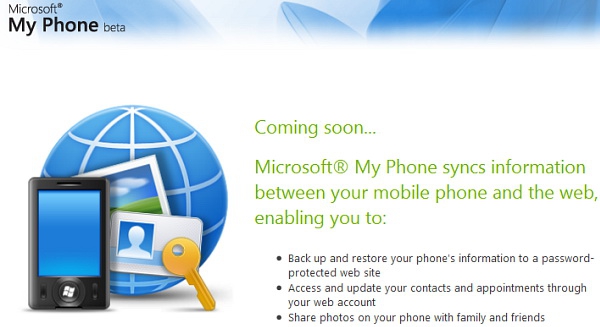
Microsoft "My Phone" Service Announced Early

Posted by Jason Dunn in "Pocket PC News" @ 05:48 PM

http://www.windowsmobile.com/myphone

This is the service we've formerly heard referred to as Skyline Skybox. Scott Rockfeld, Director in the Windows Mobile group at Microsoft, gave this public statement today:

"Today, Microsoft's My Phone Web site went live prior to its scheduled debut. However, we are excited about the new Microsoft My Phone service, which will be available as a limited, invite-only beta. This is a significant milestone for Microsoft as it connects the phone to the PC and Web, making mobility a key pillar for the company's software+services strategy.

This new Microsoft cloud service syncs critical information (e.g., contacts, calendar appointments, tasks, text messages, photos, video, etc) on a user's mobile phone to a password protected Web site. Once synchronized, people can easily back-up and restore mobile phone data. My Phone provides an easy to use Web portal where people can access and manage content on the phone, and share that information with others.

My Phone helps people:

• Keep their information backed up if they lose or break their phones.

• Transition information if they switch to new phones.

• Access the same information from their phone or PC."

This is shaping up to be a very interesting service in a number of ways - first, at launch it's going to be free. Second, if you've already got a phone synching with an Exchange server, your calendar/contacts/tasks. This is, essentially, Exchange ActiveSync for the rest of the world who's not using Exchange. We'll see how it plays out - especially how locked-in it is to Windows Live services. Will it play nice if you're using other services? Even if it doesn't, this could be THE killer reason for some people to switch to Windows Live services instead of competing services from Google, Yahoo, etc. Check out the My Phone site for more details.

UPDATE: My understanding of My Phone has been clarified - it's not "Exchange for the rest of us" like I first thought; at least, not yet.



Friday, October 17, 2008

Microsoft Exchange Chief to Take Over Windows Mobile Development

Posted by Rocco Augusto in "Smartphone News" @ 04:24 PM

http://www.computerworld.com/action...source=rss_news

"The Microsoft Corp. executive who has overseen development of the company's popular Exchange communications server software for the past seven years will take over the reportedly troubled development of Windows Mobile. Terry Myerson will become corporate vice president of the mobile communications product group. The 11-year veteran replaces corporate vice president Todd Warren, who will stay on at Microsoft as corporate vice president of technical strategy, a spokeswoman said."

The changing of the guards are always fun and I am very curious to see what kind of effect Terry Myerson will have over the development of the Windows Mobile platform. Not spending too much time working in a corporate environment such as Microsoft, I am not sure how common it is to just switch heads of departments like this in the middle of a major release for your mobile operating system. It wouldn't surprise me to find out things like this happen often though.


UsedHandhelds.com PPCTechs.com

4Smartphone

Place Your Ad Here Place Your Ad Here
Reviews & Articles

Loading feed...

News

Loading feed...

Reviews & Articles

Loading feed...

News

Loading feed...

Reviews & Articles

Loading feed...

News

Loading feed...

Sponsored links