


Monday, May 25, 2009
Further Traveling with Pharos -- the Traveler 127 reviewed
Posted by Don Tolson in "Pocket PC Hardware" @ 09:00 AM
Day-to-Day Use
I try to give every unit I review a really good run for its money, and test it in real world situations, similar (I hope) to what our readers will experience. So, for about two weeks, the Traveler 127 became my primary phone/PDA -- handling everything I normally do at home and work, and becoming my full-time digital assistant. While I wouldn't consider myself a power user, I do use my PDAs for a wide variety of tasks. Overall, the Traveler 127 did a good job of all the normal things we expect of a Windows Mobile device these days. It wasn't stellar in any one of them, but it handled things capably.
From the comparison pictures above, you can see that the unit is quite comfortable in the hand and its size and weight do not create a huge bulge in the pocket.
As you can see from the front shot, the Traveler 127 comes with only one notification LED. This sometimes makes it difficult to understand exactly what it's trying to tell you. Although the manual says there are different colours for different functions, my unit used the same blue LED for Bluetooth and Notifications. Hence, I couldn't tell if I'd gotten a message, missed an appointment, or simply forgot to turn off the Bluetooth. The LED does turn a definite red when charging and green when fully charged, which was helpful. Maybe the best bet would be to go back to two separate LEDS -- one for the radios and one for power/notifications, etc.
As I've mentioned before, I'm not really a fan of the front-facing keyboard format, but I understand the convenience of having it available. The Traveler 127's keyboard is comfortable, with good spacing and feedback and I was quickly able to get pretty good speed at typing out messages with my thumbs, etc. It did take me a little while to figure out how to get the FN and Shift keys to work. They are basically toggles for the entire keyboard, and an icon in the top row changes as you go from mode to mode. I still haven't figured out how the SYM key works, though. One thing missing from the keyboard is key equivalents for the 'soft' keys on either side of the bottom of the screen. It was a bit annoying to have to remove my hand from the keyboard to respond to a 'Next' or 'Cancel' on the screen.
I'm willing to bet this is the same trackball we saw in the 117. For some reason though, this version has a better feel to it. It's not quite as plastic-y and has a smoother action, with a bit more resistance than I found on the 117. Generally, I liked using this trackball a whole lot better and found it more accurate for moving within a screen and from screen to screen.
As mentioned above, access to the microSD card slot is through a cover on the side of the unit, which is accessible only if you take off the back panel. On the T127, the hinge to hold on the cover is still rubber, but at least it's better than the one on the T117.
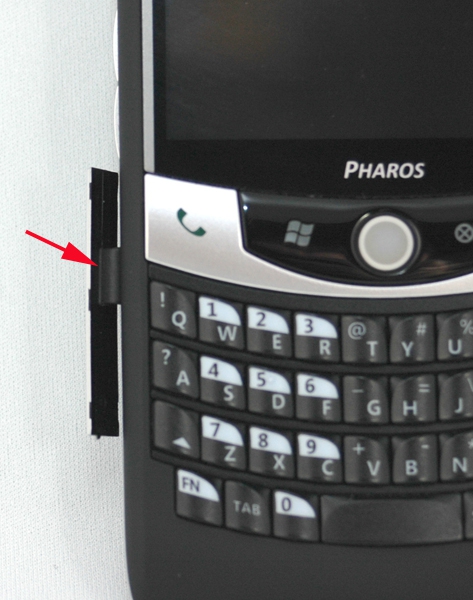
Figure 13: On the 127, the hinge holding on the cover for the microSD slot is wider and a lot sturdier. The cover itself, though is a little thin and you have to take off the back cover to get to it. When putting things back together, you need to make sure you get the little tabs stuck under the rest of the case for things to fit snugly. As with the Traveler 117, this is definitely intended as a 'load and forget' operation. If you want to swap your SD cards frequently, this won't work for you.
The 320x240 screen is not as bright or crisp as others I've tested (like the 117) and it's somewhat difficult to see in outdoor light.
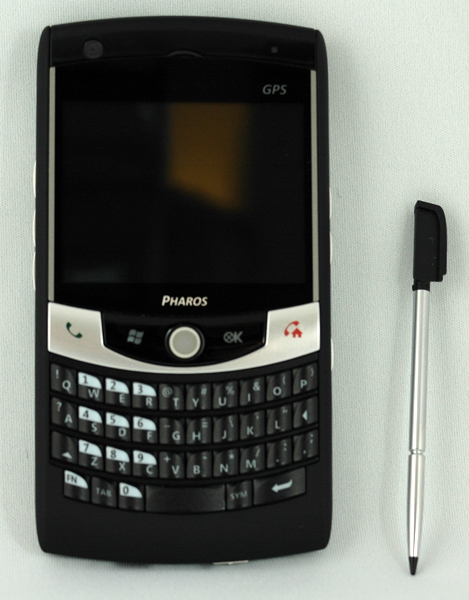
Figure 14: A comparison shot of the Traveler 127 and its included stylus. As with the 117, I found the stylus to be too small to be really usable.
As with the Traveler 117, I found response to screen taps, etc. using the stylus could be quite slow and inconsistent. After making sure the screen was aligned properly using the stylus, I still found that I needed quite firm taps or repeats. Response to finger presses was fine.
Generally, even with a slightly slower processor than the HP910 Messenger, the Traveler 127 was responsive and quick. It was noticeably slower when it was connected to the PC via Activesync or Mobile Device Center even with the sync schedule turned to 'Manual'. I also noticed an inconsistent ability to sync with Windows Mobile Device Centre under Vista. My success rate was about 60/40 as to whether it would sync or not. The T127 would always connect, but there were frequent errors with the synchronization and I was never able to trace them down to anything specific.
As with the T117, the 127 seems to take a long time to reload from a soft reset -- generally a minute or more. Once in a while, the screen would blank out during the reset or seemed to stop at the Windows Mobile green screen. Hitting the soft reset button again quickly brought things back.






